Real PTY terminal, SFTP / FTPS transfer, quick command panel and server monitoring in one panel. Credentials stay encrypted on this machine and are never synced to anyone's cloud; passwordless accounts and two-step confirmation for destructive commands suit duty stations several people share.
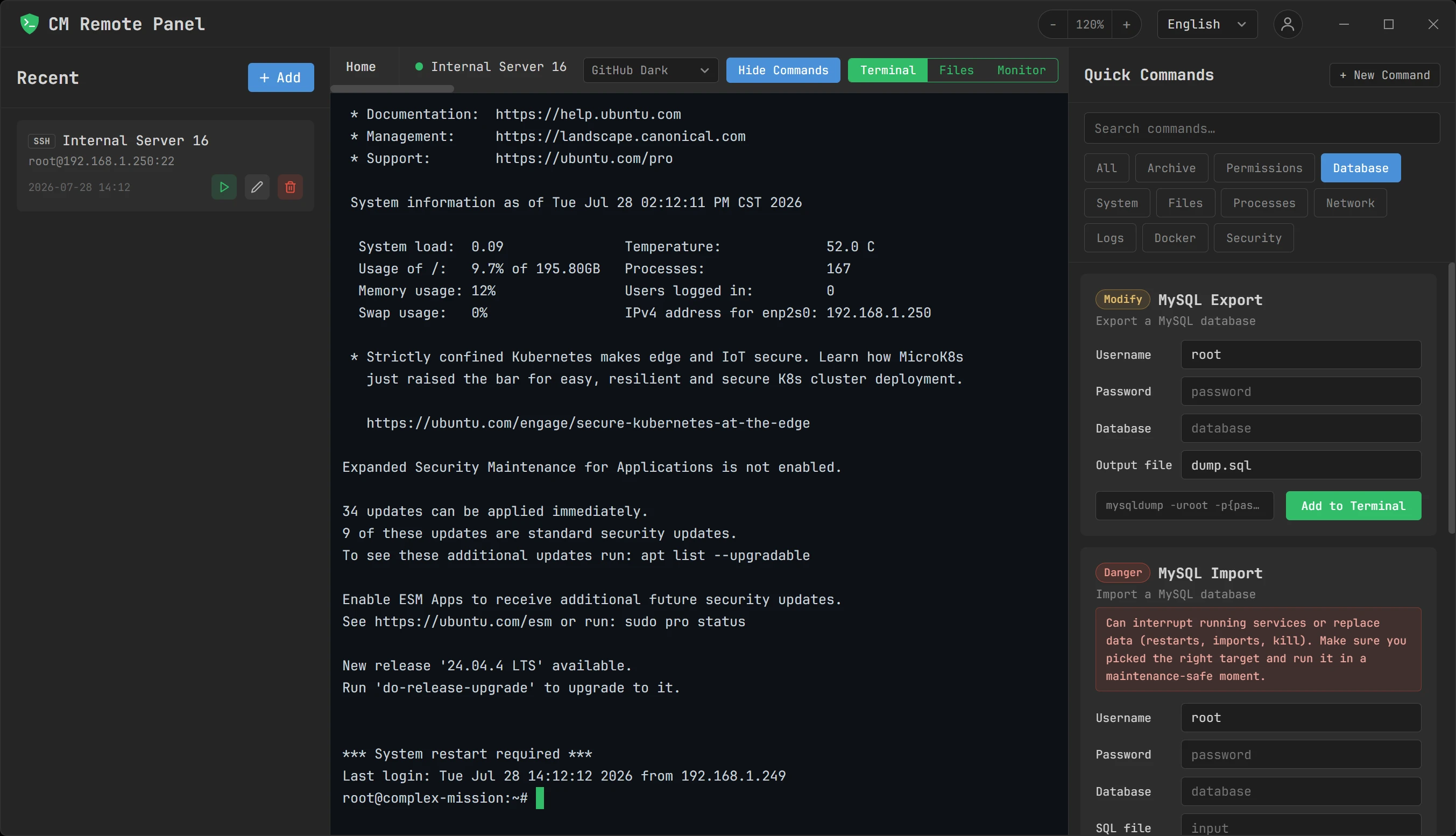
Terminal + command panelA real PTY session with the quick command panel docked beside it.
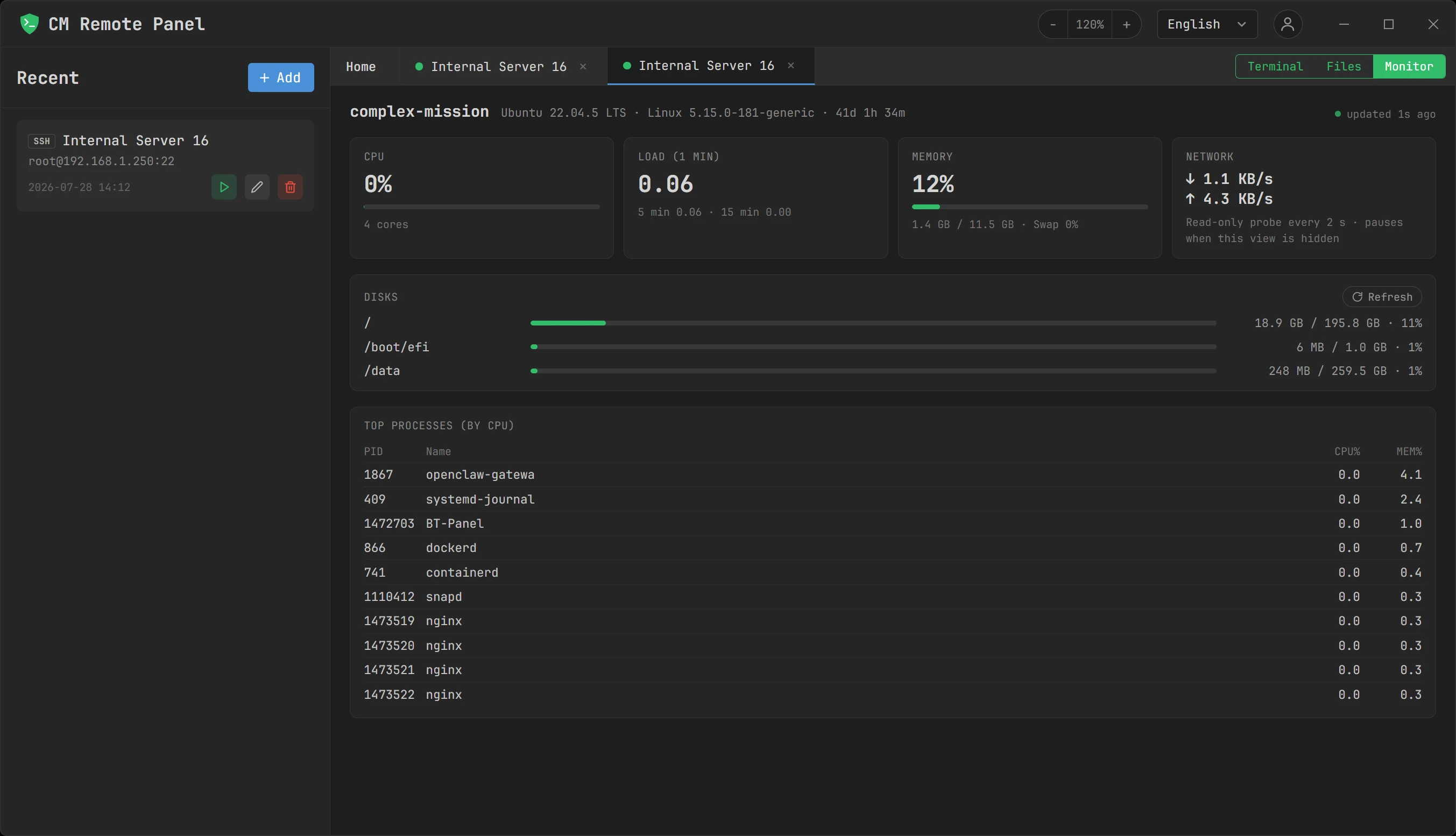
Server monitorCPU, load, memory, network, per-mount disk and process ranking from a read-only session.
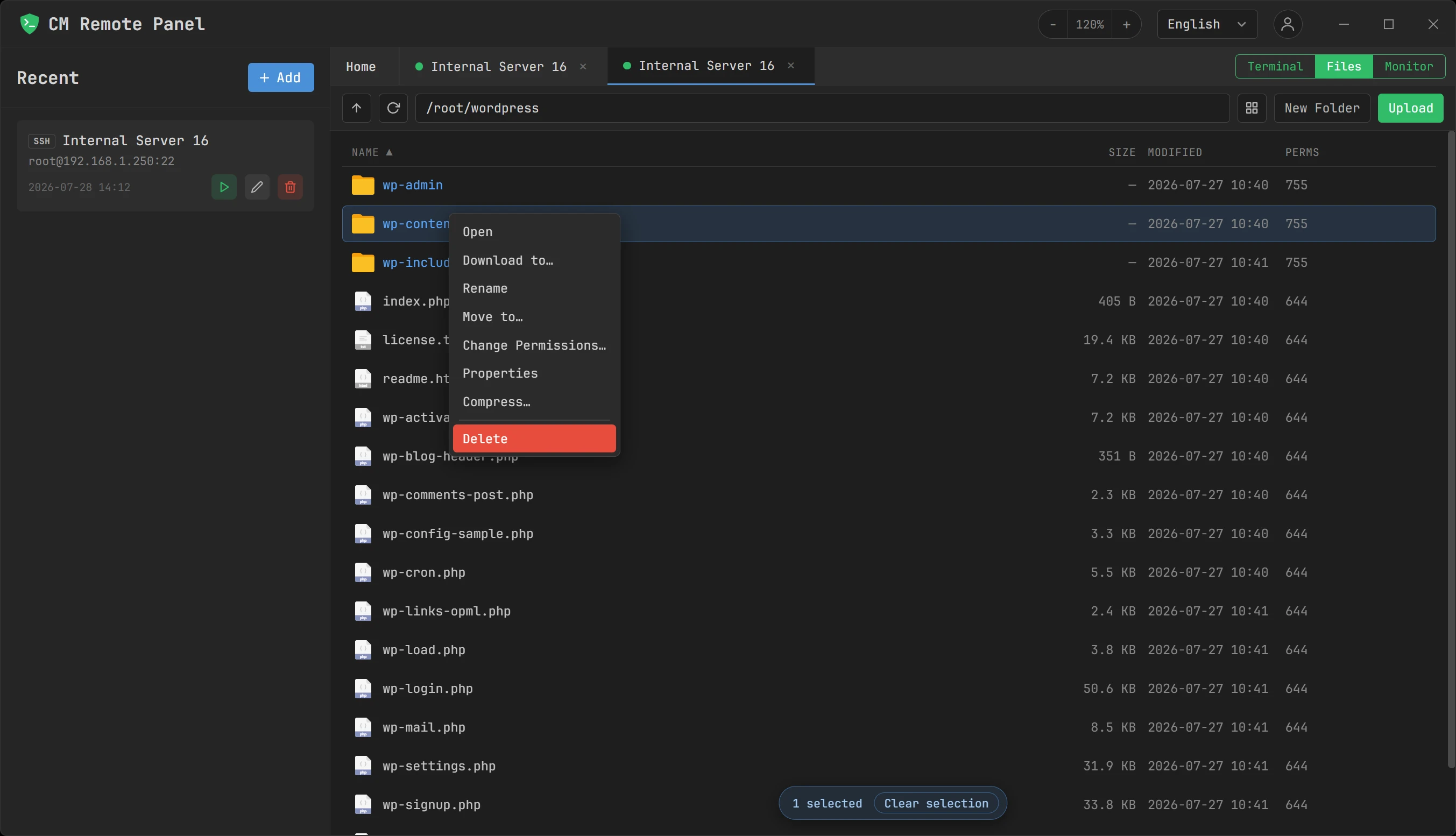
SFTP file browserSingle-pane remote browsing with rename, chmod, compress, download and batch selection.
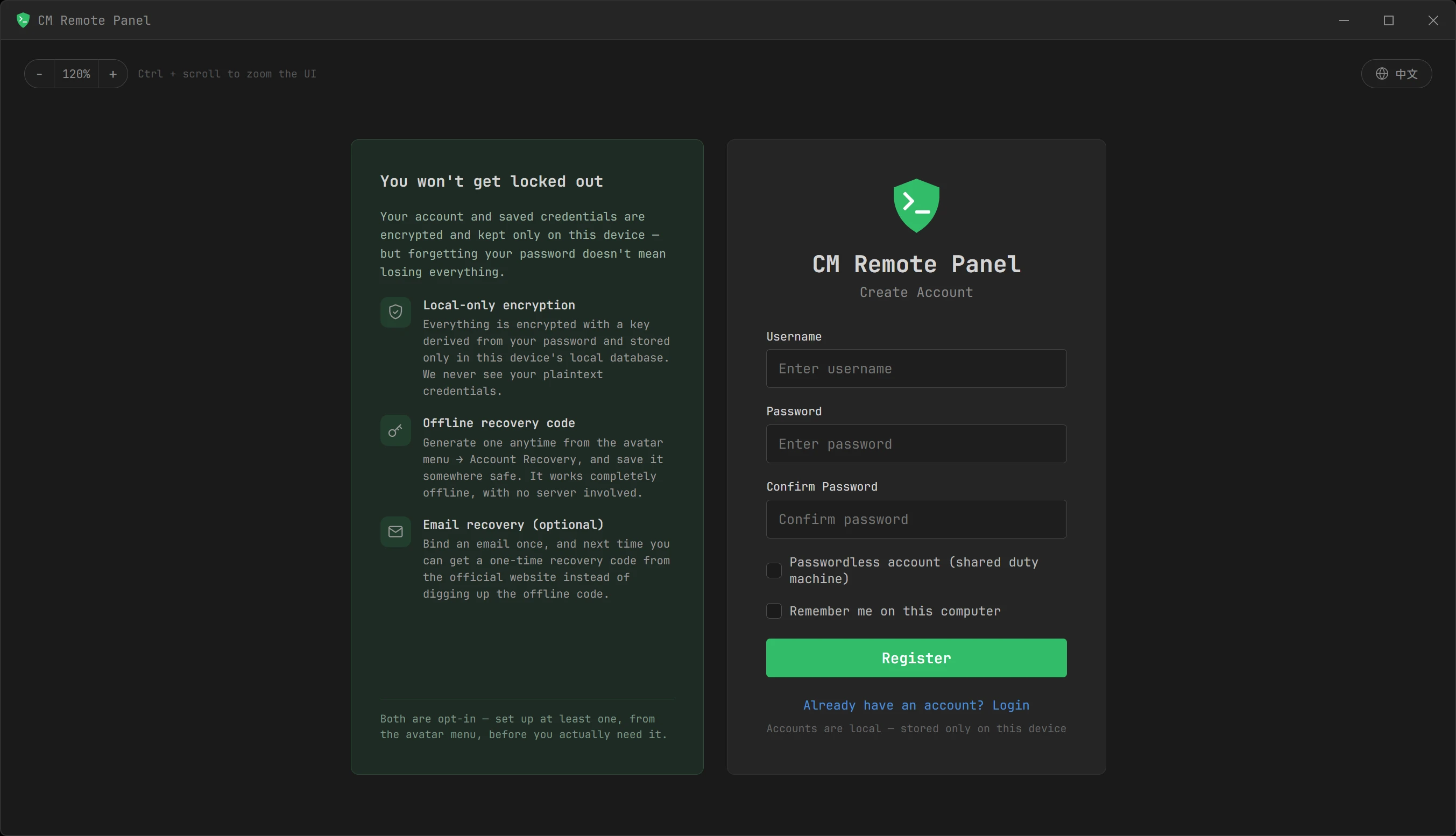
Local account, recoverableAccounts live on this machine only — offline recovery code and optional email recovery.
FEATURES
A calmer remote workflow for people who live in servers.
Rust backend, modern web UI, one clean dark panel. SSH terminal, SFTP / FTPS file transfer, quick command panel, server monitoring and a local credential vault — all in one place.
01
Real PTY terminal
Full support for vim, htop, Ctrl+C, command history and live streaming output. WebGL rendering with output batching keeps even noisy logs smooth. 6 built-in themes, Chinese IME support, tab completion, Ctrl+R reverse search — just like a native terminal.
xterm-256color · 6 themes
02
Visual SFTP
One-click switch between terminal and files. Parallel multi-file transfers with live progress, drag-and-drop upload of entire folders, folder download with directory auto-reconstruction. Single-pane design eliminates local-vs-remote confusion.
Parallel queue · single-pane
03
Quick command panel
40 built-in admin command templates ready out of the box. Risk-level color labels (query / change / dangerous / extreme) with visible warnings. Parameterized fills, live preview, one-click insertion. Custom commands encrypted and stored with AES-256-GCM.
40 templates · custom commands
04
Server monitor
CPU, load, memory, swap, network rate, disk usage per mount point and process CPU ranking — all from a pure read-only SSH session reading /proc. Updates every 5 seconds, pauses when you switch away. Bars change color at 80% / 90% thresholds.
Read-only · /proc · no root
05
FTPS transfer
Encrypted by default: an explicit TLS upgrade is enforced before credentials are sent. TLS 1.2 minimum, with the chain and hostname validated against public CAs; a self-signed certificate stops the connection until you confirm its fingerprint, and is then pinned. For legacy servers with no TLS at all, plain FTP can be enabled per connection — TLS is still tried first, and such connections carry an insecure tag in the list. You explicitly choose passive or active data mode.
Explicit TLS · TLS 1.2 or later · plain FTP is opt-in
06
One PC, one encrypted vault per account
The app supports multiple local accounts on the same computer. Each account's saved passwords, private keys and custom commands are encrypted with their own key, derived from that account's own login password via Argon2id (memory-hard) — one account can never read another's data, even sharing the same machine. The key exists only in memory after login, and changing your password automatically re-encrypts everything with a fresh one. Nothing uploaded, nothing tracked.*
Multi-account · 100% local
07
Recovering the app's own login password
This is about the password that unlocks CM Remote Panel itself — not the SSH/FTPS passwords you save inside it, which stay wherever you already keep them. Forget this login password and the locally encrypted vault of saved credentials becomes unreadable by design: we never store it and can't reset it for you. Set up a recovery path beforehand, from the avatar menu — an offline code you save yourself, email recovery through this website, or both. Email recovery only escrows an encrypted helper key on our server, and that key alone can't decrypt anything without the matching piece kept on your device.
Offline code · optional email recovery
08
Back up and move your data, on your terms
Export the entire local vault — every account on this device — any time from the avatar menu, or restore one you exported earlier; the device's existing data is kept as a dated backup file, not deleted, and applies on next restart. Need to back up or hand off just one server? Export a single connection, or several at once, protected by a password you set on the spot — completely separate from your login password, so sharing one doesn't expose anything else.
Whole-vault backup · per-connection export
HOW WE COMPARE
What we have, and what we don't.
Measured against three common kinds of product: the established commercial terminal, the all-in-one multi-protocol toolbox, and the cloud-sync cross-platform client. No product names — each has real strengths and all of them keep shipping. This table is about trade-offs, not rankings.
Capability
CM Remote Panel
Commercial terminalMature, licensed, deep feature set
All-in-one toolboxWidest protocol coverage in one install
Cloud-sync clientSubscription, multi-device, modern UI
Price
Every feature free — no paid edition, no subscription, no trial
Paid commercial licence; often a free tier for personal or educational use
Free tier capped (session count and similar); pro edition paid
Free tier limited; core capabilities usually inside the subscription
Platforms
Windows 10 1803+ / 11 x64 only — no macOS, Linux or mobile
Mostly Windows-first; some products cover other platforms
Typically Windows-only
Desktop, mobile and web
Where data lives
One local SQLite file; the encryption key exists only in memory after login
Local, usually behind a master password
Local, usually behind a master password
Cloud-synced, usually end-to-end encrypted — but the data leaves your machine
Cross-device sync
None. Moving to a new PC means exporting a backup and importing it yourself
Usually manual session-file export
Usually manual session-file export
Sign in and it syncs — this is its core value
Protocol coverage
SSH / SFTP / FTPS; plain FTP is off by default and opt-in per connection
Commonly SSH, Telnet, serial and more
The widest — often RDP, VNC, X11 and serial too
Mainly SSH and SFTP
Port forwarding / jump host
Not built yet. Local, remote and dynamic forwarding plus ProxyJump are on the roadmap
Usually a strength, with thorough tunnel configuration
Supported
Supported; sometimes behind a paid tier
File transfer
Same window as the terminal, single-pane remote view, 1–10 adjustable concurrency, per-item retry
Often requires installing a separate companion transfer app
Built-in SFTP pane beside the terminal
Supported; sometimes behind a paid tier
Server monitoring
Built in: CPU, load, memory, NIC rates, per-mount disk, process ranking — read-only /proc, no agent
Generally no resource dashboard
Some products show a basic metrics bar
Generally no resource dashboard
Command snippets
40 built-in templates plus your own, parameterised; four risk tiers, with a second confirm on the highest
Usually a quick-command bar or scripts
Usually a quick-command bar or scripts
Full snippet support, and it syncs
Scripting and automation
No macros, no scheduled jobs, no expect-style login scripting
Usually a full scripting engine
Ships a large command-line toolset and scripting environment
Varies by product
Advanced terminal features
No split panes, no session recording to file, no scrollback search, no ZModem (rz/sz)
Generally all present
Generally all present
Usually split panes and search
Session import and auto-update
Imports FileZilla site files, folders included; no auto-update yet — new versions are a manual download
Usually both
Usually both
Usually both
SupportedPartial, or depends on the product and tierNot supported
Compiled July 2026. It describes what is typical of the three categories above, not any single product; features, licensing and pricing change often, so treat each vendor's own current documentation as authoritative. Every entry in our own column matches what this version actually ships — or genuinely does not.
What we genuinely do well
All of it shipped in the current version, and checkable.
Free, no subscription — Every feature at no charge, no account to register, no feature wall
A clear data boundary — Credentials encrypted locally with AES-256-GCM under a key derived from your login password via Argon2id and held only in memory; the app reports no usage data
Three jobs, one window — Terminal, files and monitoring for the same server, one click apart — not three applications
Brakes on dangerous commands — Templates are labelled query / change / dangerous / extreme, and the top tier asks again before it even reaches the terminal
Accounts isolated on one PC — Each local account has its own key and cannot read another's data; a passwordless duty account suits machines several people share
Light to install — A small installer — the exact size is shown in the download section below — and no runtime needed beyond WebView2
What we don't have yet
If one of these is a hard requirement, one of the three categories above will serve you better.
Windows only — No macOS, no Linux, no mobile, no web version
No cross-device sync — Moving machines means exporting and importing by hand — the cost of being local-first, not a temporary gap
No port forwarding or jump host — If you need tunnels or ProxyJump, that still takes another tool
Terminal feature gaps — Split panes, session recording, scrollback search and ZModem are all missing
No scripting or scheduling — No macros, no fan-out to many hosts, no automated login responses
Only three protocols — No RDP, VNC, Telnet or serial; plain FTP exists only as an explicit per-connection fallback
No auto-update, and closed source — New versions are a manual download from this site; the source is not public — see the Help Center on redistribution
SECURITY BY DEFAULT
Security is not a switch. It is the default path.
Credentials are encrypted before they are saved, hosts are verified before authentication, and outdated algorithms are rejected before negotiation. CM Remote Panel needs no cloud account and never collects your server information.
Data boundary: your computerSingle SQLite file · Key never touches disk · No network reporting*
01
AES-256-GCM
Saved passwords and private keys are encrypted end to end — even if the database file is copied, it cannot be decrypted without your login password
02
Argon2id
Login password hashed with a memory-hard KDF (64 MiB, per-user salt); the credential encryption key is derived the same way — both exist only in memory, never written to disk
03
TOFU + session pinning
Host fingerprint confirmed on first connect; all SSH sessions under one connection must present the same host key; loud warning and refusal on change
04
TLS 1.2 or later
FTPS enforces an explicit TLS upgrade before credentials travel; chain and hostname are validated, and a certificate that fails validation is never silently accepted — you confirm its fingerprint once and it is pinned, exactly like an SSH host key
05
Modern only
curve25519 / ECDH key exchange, AES-GCM / AES-CTR encryption, HMAC-SHA2 MAC; 3DES, RC4, CBC, SHA-1 and group1 are rejected at negotiation
06
Password change re-encrypts
When you change your login password, every stored credential is automatically re-encrypted with the new key — no manual migration needed
DOWNLOAD
Start now, connect quietly.
Free to useEvery feature, at no charge — no paid edition, no subscription, no trial period. Closed source; see the Help Center for what that means for redistribution.
Windows 10 1803+ / 11 x64 — MSI installer, WebView2 runtime required (built into Win 11; auto-installed on Win 10 with internet access) · macOS 11+ — one DMG for Apple Silicon and Intel. Verify the download with the SHA-256 checksum below.
CM Remote Panel
Please visit this page on a computer to view and download.
WINDOWS X64
CM Remote Panel
Loading…
Platform
OSWindows 10 1803+ / 11 x64FormatMSISize…
SHA-256
…
Run the MSI installer · Installer not code-signed yet — verify its SHA-256 above before installing · Download links are single-use
No built-in telemetry. The update check only reads the latest version number from our site and can be turned off. Enabling email recovery sends an encrypted recovery blob to our server. Visiting the recover page to redeem a code also contacts the server.